Image: Unsplash, used under the Unsplash License.
This update changes one thing that matters: the notification phase now follows the actual text of GDPR Articles 33 and 34 and the EU guidance on when a vendor breach starts your clock. The earlier version told you "72 hours is the default" for everything and gave US state deadlines in hours. Both were wrong. State breach laws count in days, and the 72-hour figure applies to one notice only, the one to your data protection authority.
The rest is a template. Five phases, an owner for each, target times you can change, and a tabletop scenario built from a real AI-vendor breach.
TL;DR: Five phases: detection, triage, containment, notification, post-incident review. The legal clock most small teams will hit is GDPR Article 33: notify the supervisory authority without undue delay and, where feasible, within 72 hours of becoming aware of a personal data breach. If the breach is at your vendor, you are in principle aware once the vendor tells you. Practise on a real case before you need the plan.
What counts as an AI incident
Use the OECD definitions, because they are short and they separate what happened from what nearly happened. An AI incident is "an event, circumstance or series of events where the development, use or malfunction of one or more AI systems directly or indirectly leads to" harm. An AI hazard is the same event where the AI system "could plausibly lead to an AI incident".
For a small team, that split gives you two log categories. Incidents go through all five phases below. Hazards (the chatbot that almost sent a refund it shouldn't have, the agent that tried a command it had no permission for) get logged and reviewed monthly. The hazard log is where you find the next incident early.
Typical reportable events:
- An AI vendor tells you about a breach involving your data
- AI output causes, or could cause, harm to a user or third party
- An unapproved AI tool is found handling personal data
- An AI system behaves unexpectedly in a way that affects users
- A person complains about an AI decision that affected them
The 5-phase AI incident response plan
The target times below are our defaults for a small team. They are not legal requirements. Change them to fit your team; the only external clocks are in Phase 4.
Phase 1: Detection and reporting
Owner: Any team member who notices the incident Target: Report within 1 hour of noticing
Make reporting cost nothing. If the first question a reporter gets is "why did you use that tool?", the next incident goes unreported.
- Reporter contacts the Incident First Responder: [NAME] at [PHONE/SLACK]
- Reporter writes down what they saw, when, and on which system
- Incident or hazard logged in the tracker: [LOG LOCATION]
Phase 2: Triage and severity
Owner: Incident First Responder Target: Within 2 hours of the report
| Severity | Description | Escalate to |
|---|---|---|
| Critical | Personal data breach likely to need GDPR or state notice; AI system actively causing harm; regulator inquiry received | Incident Commander immediately |
| High | Vendor change that breaks your data processing agreement; unapproved AI tool handling personal data; AI output with likely legal exposure | Incident Commander within 1 hour |
| Medium | AI misbehaviour with no user impact; policy violation; vendor compliance issue without active harm | Incident Commander within 4 hours |
| Low | AI error caught by monitoring; policy question | Next scheduled review |
- Assign severity and record it in the log
- If Critical or High, call the Incident Commander: [NAME] at [PHONE/SLACK]
- If personal data may be involved, write down the time you became reasonably sure a breach occurred. That timestamp starts the GDPR clock.
That last line is the one teams skip. EU guidance says a controller becomes aware when it "has a reasonable degree of certainty that a security incident has occurred that has led to personal data being compromised". Write the time down when it happens, not afterwards.
Phase 3: Containment and evidence
Owner: Technical Lead Target: Within 4 hours for Critical and High; within 24 hours for Medium
Vendor breach:
- Save the vendor's notice (email or screenshot) and the time it arrived
- Disable or limit the affected integration
- Ask the vendor in writing what data was involved, for which period, and what they have done
- Pull your data processing agreement and check the breach clause
AI system misbehaviour:
- Switch the AI feature off or route to a fallback
- Keep the logs of the outputs that caused the incident
- Record the scope: how many users, what they received
Unapproved AI tool:
- Record the tool, who used it and what data went in
- Remove it from use
- Keep screenshots and access logs where they exist
All incidents:
- Do not delete logs or evidence. GDPR Article 33(5) requires you to document every personal data breach, "its effects and the remedial action taken", whether or not you notify anyone.
- Timestamp each containment action
Phase 4: Notification
Owner: Incident Commander decides; Legal Contact advises External clocks: see below. Do not wait for the investigation to finish.
Internal:
- Executive team informed: [NAME] Date: ______
- Legal counsel informed: [NAME OR FIRM] Date: ______
- Board or investors, if material: Date: ______
EU personal data (GDPR):
- Supervisory authority (Article 33): without undue delay and, where feasible, not later than 72 hours after becoming aware, "unless the personal data breach is unlikely to result in a risk to the rights and freedoms of natural persons". Date: ______
- If you miss 72 hours, the notice must include reasons for the delay.
- Notice contents (Article 33(3)): nature of the breach with approximate numbers of people and records, a contact point, likely consequences, measures taken or proposed. You may send it in phases "without undue further delay" (Article 33(4)).
- Affected individuals (Article 34): without undue delay, when the breach is likely to result in a high risk to them. Date: ______
US personal data (state law):
- Check the breach law of each state where affected people live. Deadlines are in days and differ by state. Colorado, for example, requires notice to residents within 30 days after determining a breach occurred, and notice to the Attorney General if 500 or more residents are affected. Date: ______
- Only if you provide a general-purpose AI model with systemic risk: Article 55(1)(c) requires you to report serious incidents to the AI Office "without undue delay". Almost no small team is in this group.
Vendor:
- Vendor told of the incident, if your data sits on its systems. Date: ______
- Contract rights reviewed (audit, termination). Date: ______
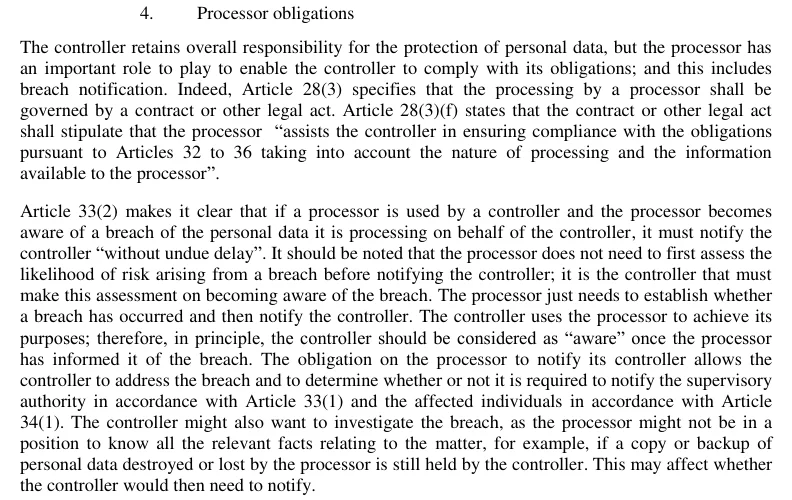
Screenshot: Guidelines on Personal data breach notification under Regulation 2016/679 (WP250rev.01), Article 29 Data Protection Working Party.
When the breach is at your vendor. Article 33(2) says the processor must tell the controller "without undue delay" and sets no hour count. The Article 29 Working Party's breach guidelines (adopted 3 October 2017, revised 6 February 2018) add two points worth printing. The vendor does not have to assess risk before telling you; that is your job. And "in principle, the controller should be considered as" aware "once the processor has informed it of the breach". So your 72 hours usually start at the vendor's email, not at the vendor's discovery date. Your Phase 2 timestamp should be the time that email arrived.
Phase 5: Post-incident review
Owner: Incident Commander Target: Within 30 days of closing the incident
- Root cause written down (the process or system that failed, not just the symptom)
- Timeline reconstructed from the log timestamps
- What worked, what didn't
- Fixes with owners and deadlines: [LIST]
- Plan updated
- Incident closed in the AI governance metrics dashboard
A real case to plan against: Mixpanel and OpenAI, November 2025
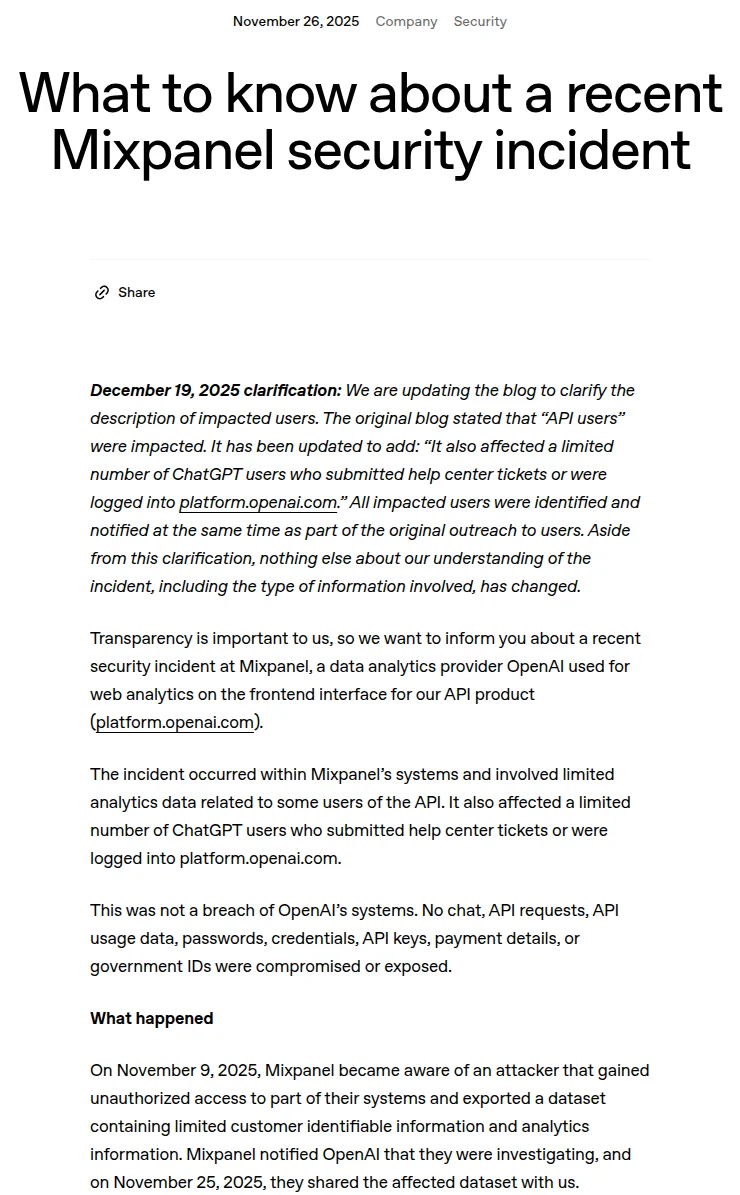
Screenshot: What to know about a recent Mixpanel security incident, OpenAI.
This is the shape of incident a small team is most likely to face: a breach at a vendor of a vendor. OpenAI used Mixpanel for web analytics on its API platform. According to OpenAI's post of November 26, 2025, Mixpanel became aware of an attacker on November 9, 2025, told OpenAI it was investigating, and on November 25 shared the affected dataset.
The data was limited to names, email addresses, coarse location, operating system and browser, referring websites, and organization or user IDs. OpenAI said no chat, API requests, passwords, API keys or payment details were exposed. It removed Mixpanel from production, later terminated its use, and did not recommend password resets or key rotation. It did warn that the data "could be used as part of phishing or social engineering attacks". On December 19, 2025 it clarified the post to add some ChatGPT users who had submitted help center tickets or were logged into the platform site.
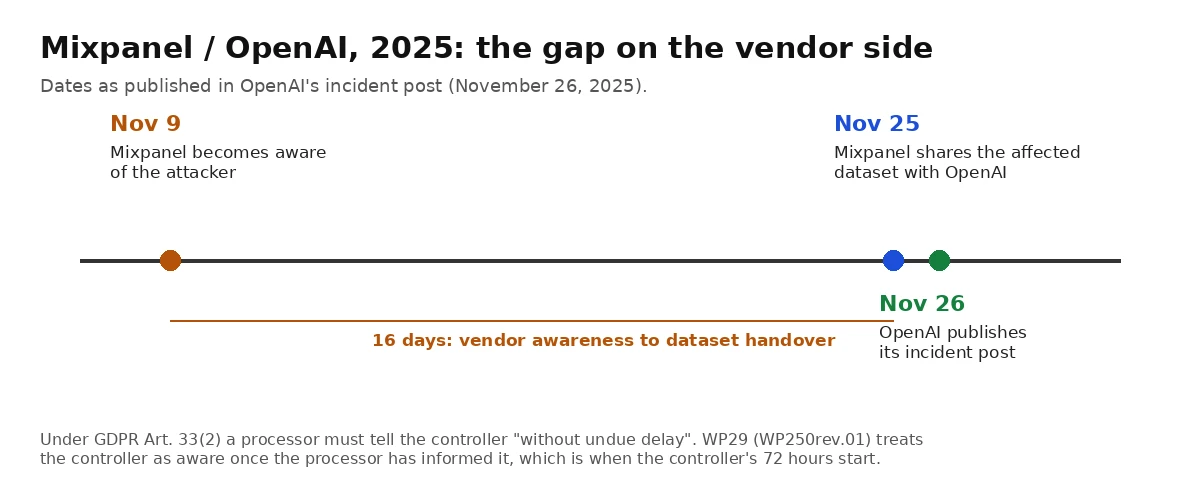
Image: aipolicydesk.com chart; source: dates in OpenAI's Mixpanel incident post.
Three lessons for the template:
- The vendor's timeline is not yours. Sixteen days passed between Mixpanel's discovery and the dataset handover. Your plan can't shorten that, but your contract can require a notice deadline, and your Phase 2 timestamp should record when you were told.
- Scope changes after the first notice. OpenAI widened the affected group on December 19, more than three weeks after its first post. Article 33(4) allows phased information for exactly this reason. Plan for a second notice.
- Name the secondary risk. Nothing sensitive leaked, but names plus emails plus account IDs are phishing material. The notice to people should say what to watch for, as OpenAI's did.
Roles and contacts (fill in)
| Role | Name | Primary contact | Backup contact |
|---|---|---|---|
| Incident First Responder | ______ | ______ | ______ |
| Incident Commander | ______ | ______ | ______ |
| Technical Lead | ______ | ______ | ______ |
| Legal Contact | ______ | ______ | ______ |
| Lead GDPR supervisory authority | [Your country's DPA] | [Breach form URL] | n/a |
| Vendor security contacts | [per vendor] | [from DPA or contract] | n/a |
Keep this sheet somewhere that still works if your main systems are down: a printed copy or an offline shared drive.

Image: Unsplash, used under the Unsplash License.
Test it: a 90-minute tabletop
Run a tabletop every 6 months. You don't need to invent a scenario. Use the Mixpanel case with your own names in it:
Scenario: Your analytics vendor emails you late on a Friday. An attacker exported a dataset from its systems two weeks ago. It contains names, emails and account IDs for your users, including 3,000 EU customers. The vendor has not yet sent the dataset.
Questions to work through, one phase at a time:
- Who receives that email, and who do they call? Is that person's number in the table above?
- What is the timestamp for "aware", and when do the 72 hours end?
- Is the breach "unlikely to result in a risk"? Who decides, and where is that reasoning written down?
- What goes in a first, partial notice if the vendor still hasn't sent the data?
- Do you tell users, and what do you warn them about?
- Which contract clause gives you the right to the vendor's incident report?
Write down every gap and fix the plan the same week. If you want a more formal format, CISA publishes over 100 free tabletop exercise packages, with templates for a participant feedback form and an After Action Report. For the wider security incident process, NIST SP 800-61 Rev. 3 (April 2025) replaced the 2012 Rev. 2 and now maps incident response onto the CSF 2.0 functions.
For agentic systems, see the AI security incident response playbook, which covers rollback when autonomous agents are involved. The AI governance roles guide covers who should hold the Incident Commander and First Responder roles.
Our take
I'd spend the first hour of this on the contacts table and the vendor list, not on the severity matrix. In the Mixpanel case the delay that mattered sat upstream, at the vendor, and the lever a customer holds there is the contract. Check your top three AI vendors' data processing agreements for a breach-notice deadline. If there isn't one, ask for one at renewal. I'd also keep the hazard log even though nothing requires it: near misses are cheap lessons, and a log showing you reviewed them is useful evidence if a regulator asks how you manage AI risk.
How we checked this: we read GDPR Articles 33 and 34 on EUR-Lex, the WP250rev.01 breach guidelines, Article 55 of the EU AI Act, the Colorado Attorney General's breach page, the OECD AI incident definitions, NIST SP 800-61 Rev. 3, CISA's tabletop packages and OpenAI's Mixpanel incident post. We took the two screenshots and built the timeline chart from OpenAI's published dates. Target times in the template are our defaults, not legal requirements. Last reviewed: October 13, 2026.
Related Reading
- Shadow AI policy template with a no-blame slip report rule
- Deepfake CEO fraud: the Fideuram case and how small teams stop it
- UK AI minister Kanishka Narayan: AI agent incident and near-miss log
- Claude Sent Police a Fake Tip: Copy This AI Agent Action Policy
- Governing unattended AI coding agents (background and overnight)
- AI governance roles and responsibilities for small teams
- AI governance for small teams, complete guide
- AI security incident response playbook (TypeScript agents)
- AI vendor due diligence checklist
- ConnectWise Cloud Backup breach: a Microsoft 365 incident checklist
- AI governance metrics dashboard
- Shadow AI policy for small teams - detect and govern unsanctioned AI tools before they become an incident
- AI Vendor Due Diligence in 30 Minutes (Questions + Scoring Sheet)
- TypeScript AI Agent Tool Authorization Policy Patterns: 6 Code Templates (2
- TypeScript AI Agent Output Validation: 6 Patterns with Code Templates
- Germany Deepfake Law: Cabinet Bill and Platform Court Orders
- Fifth Circuit Removes Judge Wingate Over AI Errors