Image: Pexels, used under the Pexels License.
TL;DR: A June 14, 2026 GitHub issue showed OpenAI Codex writing its SQLite feedback log so hard that one machine logged about 37 TB in 21 days, which the reporter extrapolated to roughly 640 TB a year. OpenAI merged fixes on June 22 and 23 and more on July 9, shipped across releases 0.142.0, 0.143.0 and 0.145.0. Most AI acceptable-use policies say nothing about what a tool does to the machine it runs on. This guide adds those clauses.
Update, October 10, 2026: This guide was rechecked against the GitHub issue, the pull requests and OpenAI's Codex configuration reference. The earlier version said the bug was first reported on June 22 and that OpenAI closed it that day with two fixes. The issue was opened on June 14, three fixes merged on June 22 and 23, four more followed on July 9, and GitHub shows the issue closed on July 12. The "85%" figure was the reporter's own estimate, not OpenAI's. We also removed unsourced claims about how other coding tools cache data and download models.
What happened with OpenAI Codex
On June 14, 2026 (UTC), GitHub user 1996fanrui opened issue #28224 in OpenAI's Codex repository: "Codex SQLite feedback logs can write ~640 TB/year and rapidly consume SSD endurance." Notebookcheck covered it on June 22.
The writes went to a local SQLite feedback log database, ~/.codex/logs_2.sqlite, plus its -wal and -shm files. The reporter's numbers:
| Measurement (one machine) | Value |
|---|---|
| Uptime | about 21 days |
| Written to the main SSD | about 37 TB |
| Reporter's yearly extrapolation | roughly 640 TB |
| On a 1 TB SSD | about 640 full-drive writes per year |
| Share of retained log bytes at TRACE level | about 70.7% |
The reporter added that some consumer SSDs are rated around 600 TBW, "so this could consume roughly a full drive's warranted write endurance in less than a year."
Why so much? OpenAI's own pull requests explain it. The local SQLite log sink "enables TRACE for every target," and every successful Responses WebSocket event produced "three local log records: the full payload at TRACE, an OpenTelemetry log event, and an OpenTelemetry trace event." Notebookcheck added that the sink ignored the standard RUST_LOG variable, "so there's no obvious way to turn it down."
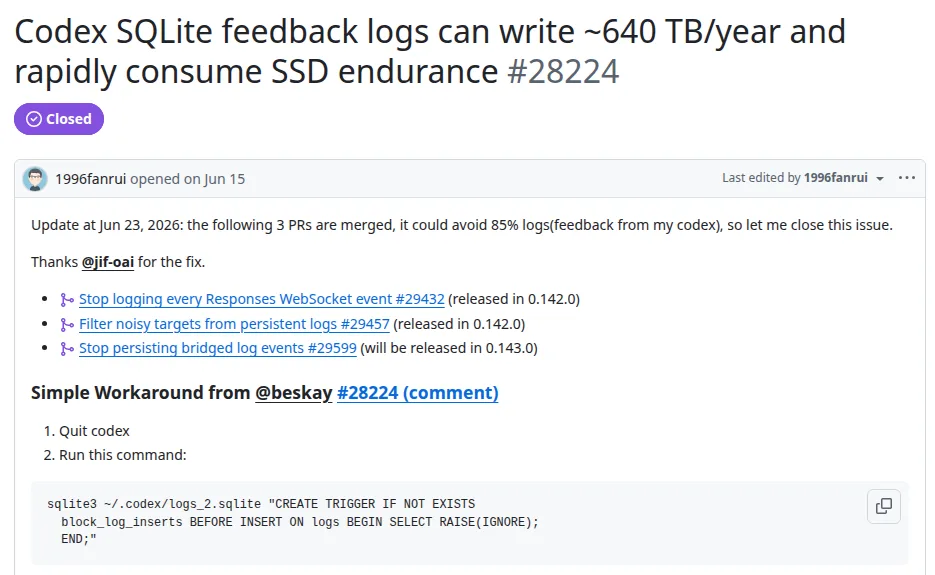 Screenshot: issue #28224, openai/codex on GitHub. GitHub shows the open date in the viewer's time zone.
The fix came in waves, not in one patch
| Date (UTC) | What happened | Source |
|---|---|---|
| June 14, 2026 | Issue #28224 opened | GitHub issue |
| June 22, 2026 | PR #29432 merged: stop logging every Responses WebSocket event | PR #29432 |
| June 22, 2026 | PR #29457 merged: filter noisy targets from persistent logs | PR #29457 |
| June 22, 2026 | Release 0.142.0 published, with both PRs | issue update, release page |
| June 23, 2026 | PR #29599 merged, because high-volume TRACE events kept "reaching SQLite" | PR #29599 |
| July 8, 2026 | Release 0.143.0 published | release page |
| July 9, 2026 | Four more PRs merged (#31789, #31790, #31791, #31792) | PRs |
| July 11, 2026 | Separate issue #32496 opened about the desktop app (still open) | GitHub issue |
| July 12, 2026 | GitHub shows issue #28224 closed | GitHub issue |
| July 21, 2026 | Release 0.145.0 published, listing #31789, #31792 and #31791 | release page |
On June 23 the reporter updated the issue: "the following 3 PRs are merged, it could avoid 85% logs(feedback from my codex)." That 85% is one user's measurement on one machine.
The July round shows the first fixes did not cover everything. One PR says MCP service events at TRACE were "the largest retained source and individual rows reached about 2 MiB." Another replaced a full dump of streamed response items, which made "the SQLite copy both redundant and potentially large or sensitive." That last point matters for compliance as much as for hardware: a debug log was holding a second copy of assistant output on the laptop.
Issue #32496, filed July 11, is a different problem in the desktop app: two small JSON files that, over 7 days, "accounted for about 24.9 GB of path-attributed local NVMe writes." It was still open when we checked.
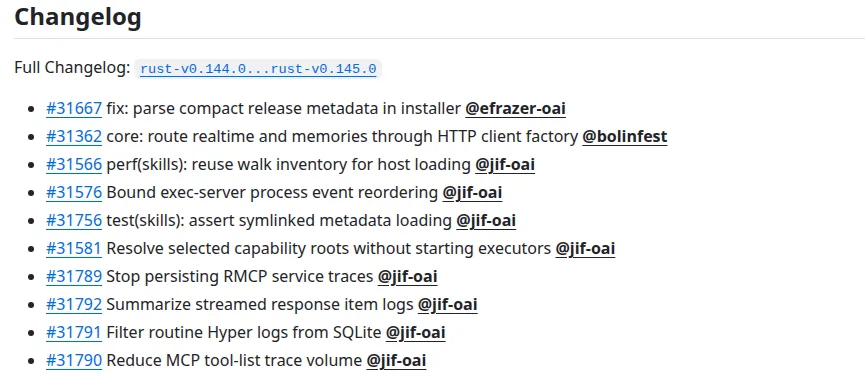 Screenshot: rust-v0.145.0 release notes, openai/codex on GitHub.
What users reported in the thread
The issue drew 154 comments. A few that show why one patch was not the end of it:
"Activity Monitor showed that the
codexprocess had written about 50 GB of data." (comment on #28224, macOS and the Codex app)
"On ubuntu, using
sudo iotop -aoPI can see that Codex writes around 10MB of data per second" (comment on #28224, on version 0.142.0)
"0.143.0 (published today) actually has #29599 in it now, and it works." (comment on #28224, July 8)
And the governance question in one line: "why is it logging at TRACE in the first place ?" (comment).
Workarounds people used
The issue itself lists a workaround: quit Codex, then add a SQLite trigger that ignores inserts into the logs table (CREATE TRIGGER IF NOT EXISTS block_log_inserts BEFORE INSERT ON logs BEGIN SELECT RAISE(IGNORE); END;). Notebookcheck described symlinking the file to /tmp/ on Linux and macOS and said "the file holds no conversation data, so losing it on reboot is fine." Both are user hacks, not vendor guidance. The governed fix is to update to a release with the patches and then measure.
Why this is a governance gap
If your AI acceptable-use policy covers what data goes into the tool, who owns the code that comes out and who reviews it, it covers the tool as a service. It does not cover the tool as software running on your hardware. Codex is a local agent: it keeps state on the laptop, writes logs, and runs for as long as the session does. Nothing in a data-and-output policy tells anyone to check what that local process is doing to the disk.
Three things in this incident are policy questions, not bug-tracker questions:
- Who notices. The reporter noticed unusually high disk activity and traced it to the log files. Most staff would never look.
- Who decides when it is fixed. The reporter closed the issue on an 85% estimate; later fixes and a new issue followed. "Update to the latest version" is not a check.
- What the logs held. OpenAI's own PR says the response-item log could be "large or sensitive." A debug database on a laptop is now part of your data map.

What your AUP needs to add: 6 clauses
Copy these into your AI acceptable-use policy and fill in the brackets.
1. Approved endpoints. "AI coding tools that run locally (command-line tools, desktop agents, IDE agents) may only be installed on company-managed endpoints enrolled in [MDM tool]. Personal devices are excluded."
2. Version floor after vendor patches. "When a vendor ships a fix for a security, data or resource-use defect in an approved AI tool, affected endpoints must run the fixed version within [7/14] days. IT will name the minimum version in the approved-tools register."
3. Report unusual resource use. "Employees who see unexpected disk, CPU, network or API cost activity from an AI tool must report it to [IT channel] within [24] hours. Reporting a tool problem is never a disciplinary matter."
4. Unattended runs. "Running an AI agent unattended for more than [2/4/8] hours requires manager approval and an entry in the agentic AI register. API keys used for unattended runs must have spending limits."
5. Local logs and caches are company data. "Logs, caches and history files written by AI tools on company endpoints are company data. They may contain prompts, code or model output, are covered by the data classification policy, and must not be copied to personal storage."
6. Admin-managed settings. "Where a vendor supports admin-enforced configuration, IT sets logging, history and telemetry options centrally. Users may not override them."
We dropped an earlier clause that made employees pay for damaged hardware. The Codex reporter found the problem by checking; a clause that punishes the person who notices discourages exactly that.
Codex settings IT can manage
For Codex specifically, OpenAI's configuration reference describes the controls. These are the ones relevant to this incident:
| Setting | What the reference says it does |
|---|---|
requirements.toml |
"an admin-enforced configuration file that constrains security-sensitive settings users can't override" |
| Cloud-fetched requirements | "For ChatGPT Business and Enterprise users, Codex can also apply cloud-fetched requirements." |
log_dir |
"Directory where Codex writes log files; defaults to $CODEX_HOME/log" |
sqlite_home |
"Directory where Codex stores the SQLite-backed state DB used by agent jobs and other resumable runtime state." |
feedback.enabled |
"Enable feedback submission via /feedback across local clients (default: true)." |
history.persistence, history.max_bytes |
Control whether transcripts are saved to history.jsonl and cap the file size |
otel.log_user_prompt |
"Opt in to exporting raw user prompts with OpenTelemetry logs." |
Read the reference for which keys requirements.toml actually accepts before you promise anything in policy. The point for the AUP is clause 6: if the vendor gives admins a file users cannot override, use it.
How to audit which AI coding tools are in use
- Endpoint software inventory. Most MDM platforms can list installed applications. Search for the coding tools your teams use, including command-line tools installed by package managers, which may not show up as applications.
- Expense and card review. Look back six months for AI subscriptions on expense reports and corporate cards.
- Ask engineering leads. Self-reporting catches tools on personal accounts that never hit company billing.
- Check the Codex log on machines that run it. Look for
logs_2.sqliteunder~/.codexand note its size and how fast it grows over a working day. Compare with the version installed. - Check drive health on developer machines. Compare total bytes written with the drive's rated endurance (TBW) and flag drives that are well along.
Practical checklist: 8 items for IT and compliance teams
- 1. List every AI coding tool on company endpoints (MDM inventory)
- 2. Update Codex to 0.145.0 or later, then re-measure disk writes on a few machines
- 3. Check drive write totals on machines that ran Codex before the June and July fixes
- 4. Add the six clauses above to your acceptable-use policy
- 5. Set spending limits on API keys used by agents
- 6. Decide which Codex settings IT manages through
requirements.toml - 7. Add AI tool logs and caches to your data map
- 8. Subscribe someone to the vendor's issue tracker or release notes for each approved tool
Our take
The bug itself got fixed. What is worth keeping from it is how it got fixed: a user measured it, the vendor merged the first fixes eight days later, the reporter closed the issue on their own 85% estimate, users kept reporting writes on the patched version, and a second round merged on July 9 and shipped in 0.145.0 on July 21. A separate desktop-app issue was still open when we checked. That is a normal vendor bug cycle. Your policy should assume it, not assume one patch ends it.
The detail we would put in front of a privacy team is in PR #31792: a debug log was keeping a copy of response items that OpenAI itself called "potentially large or sensitive." Logs on laptops rarely make it into a data map. AI agents make them bigger and more interesting.
For deeper coverage of agent approvals, see our guide to governing unattended AI coding agents. For visibility into which tools are in use at all, the shadow AI governance guide covers inventory methods.
How we checked this
We read GitHub issue #28224 and its comments, seven pull requests (#29432, #29457, #29599, #31789, #31790, #31791, #31792), the 0.142.0, 0.143.0 and 0.145.0 release pages, issue #32496, OpenAI's Codex configuration reference, and Notebookcheck's June 22 report: 6 sources, counting the pull requests and the release pages as one each. Four community quotes come from comments on the issue; we did not use Reddit. We found no OpenAI post or video about the bug, so there is no embed. Every fact above has a row with a verbatim quote in our source log. Last reviewed: October 10, 2026.